| Streamline Your BTO Workflow. |
We’re proud to support a smoother workflow between Titley Scientific and the BTO Acoustic Pipeline.
From the moment you configure your detector, through to vetting species analysis results, our tools are designed to work better together. Reducing admin and giving you more time to focus on ecology.
What is the BTO Acoustic Pipeline? It’s a tool developed by the British Trust for Ornithology to automatically analyse and identify recordings of bats, birds, and other wildlife from across Europe. Find out more here.
Click here for a PDF guide on BTO Pipeline compatibility.
Configure Your Recorder for BTO Compatibility
Before deployment, it’s important to ensure your recordings meet the BTO Acoustic Pipeline upload requirements.
1) Full Spectrum Recording
The BTO Acoustic Pipeline only accepts full spectrum (.wav) recordings. Under Recording Settings/Profile on your recorder, the File Type must be set to WAV (not ZC).
2) Standardised Sample Rates
Set your detector to a supported, standardised sample rate. If your recorder is reporting the precise sample rate in the WAV file metadata the file won’t be compatible with the BTO Acoustic Pipeline. Under your Device Settings, for WAV Sample Rate Precision, choose Standard.
3) Maximum File Length (for bat / ultrasonic recording only)
Use the maximum file duration setting on your recorder to align recordings with BTO Acoustic Pipeline file handling requirements. This means your recordings won’t need to be split by the BTO Acoustic Pipeline during analysis. If your recordings are split by the BTO Acoustic Pipeline, they will no longer be compatible with the free version of Insight, and they may not contain the full GUANO metadata originally included with the file.
Under Recording Settings/Profile, ensure the Maximum File Length is 5 Seconds.
4) 10kHz High Pass Filter (for bat / ultrasonic recording only)
If you are also targeting small terrestrial mammals or birds, ensure that the 10kHz High Pass Filter is disabled. When enabled, it will attenuate all signals below 10kHz, meaning that lower frequency sounds will not be identifiable by the BTO Acoustic Pipeline.
Under Recording Settings/Profile, if you are only targeting bats – ensure the 10kHz High Pass Filter is On; if you are targeting small mammals and/or birds – ensure it is set to Off.
Prepare Recordings Before Upload (for ultrasonic / bat recording only)
5) Time-Split Recordings
If your recordings are longer than 5 seconds, you can use the time split tool in Insight to break the files down to 5 seconds, compatible with the BTO Acoustic Pipeline. This ensures you retain all file metadata, preserve the original file signature, thereby maintaining compatibility with free Insight software.
To split recordings:
- Select all the recordings you wish to split in the Stores Panel
- Right click and select Export Selected.
- For Export Mode choose Copy and Time Split
- Set the Maximum File Length to 5 Seconds
- Choose your Export Location (this must be a different folder to the source files)
- Click Export.
Bring BTO Results Straight into Your Workflow
6) Seamless Results Import Tool
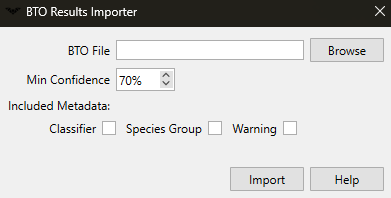
Once the BTO Acoustic Pipeline has completed species analysis, use Insight’s results importer tool to place the species identifications directly onto the corresponding files.
This makes it easy to:
- Vet species detections
- Relabel or remove incorrect identifications
- Visualise and add missing identifications
- Generate reports such as species counts
- Keep results with the original data, not lost on a separate spreadsheet
To import your BTO Acoustic Pipeline results:
- Ensure your results.csv is located in the same folder as your original data.
- Open the folder of data into the Stores Panel
- Go to the Plugins menu at the top of Insight and select BTO Results Importer
- Click Browse and select your results.csv
- Choose the minimum confidence level you want species labels to be applied at. For example, only apply the species label if confidence is above 70%.
- Click Import
All of your files will now be labelled, and species labels will include the confidence level from BTO Acoustic Pipeline.
The result of these tools is a far more connected workflow from recording → analysis → vetting → reporting.
Spend Less Time on Admin, More Time on Ecology
By combining on-device configuration, file preparation, and direct results importing, the workflow between Titley Scientific and the BTO Acoustic Pipeline becomes faster, cleaner, and easier to manage.
A more connected process means less manual handling and more confidence in your acoustic data workflow.